
How teams use Tara as their AI product analyst


Product teams often feel like they’re drowning in data but starving for insights. Turning raw behavior into clear, actionable direction is still slow, manual, and fragmented. Session replays are widely used, yet reviewing them takes time, offers limited coverage, and often delays decisions.
Tara changes this. By automatically analyzing visual user behavior, she surfaces patterns, explains what’s going on, and suggests what to do next, all within minutes. Instead of searching through recordings, teams can move straight from question to clarity.
But Tara isn’t just a faster way to review sessions. She’s a new way to make product decisions.
Through analysis of how teams use product analytics in practice, we found that most high-priority needs show up in a few recurring moments: when teams are trying to understand user journeys, fix onboarding and registration, or diagnose friction and errors.
This article walks through how teams use Tara in those moments; not as a search tool, but as a product analyst, and how that changes the way decisions get made.
Mastering user journey exploration
The way users actually navigate your app often differs from the “happy path” you designed. For example, in an ecommerce app, you might want to understand the most common actions users take and whether they get distracted before reaching the cart.
From raw data to real behavior patterns
Imagine you are new to your role or company and don't know where to begin. The first thing you need is a basic understanding of your users.
So you ask Tara:
“What are the most common user journeys in my app?”
By asking this single question, we instantly uncovered:
The actual paths users are taking,
Where users are struggling most,
Suggested actions for next steps.
Did you realize it also tells what happened and gives recommendations for each user journey? Tara doesn’t just list journeys; she explains the "why" and provides actionable recommendations for each path.
Trust the data without hallucinations
When exploring complex paths, you need an analyst you can trust. Unlike standard AI bots that might "guess" or hallucinate a path when they lack data, Tara is an Honest AI.
We train Tara not to hallucinate. If she doesn’t have enough data, information, or knowledge, she won’t make up data just for the sake of answering . She will let you know if the evidence is not there and provide you action. You get reliable behavioral analysis that reflects reality, not AI imagination.


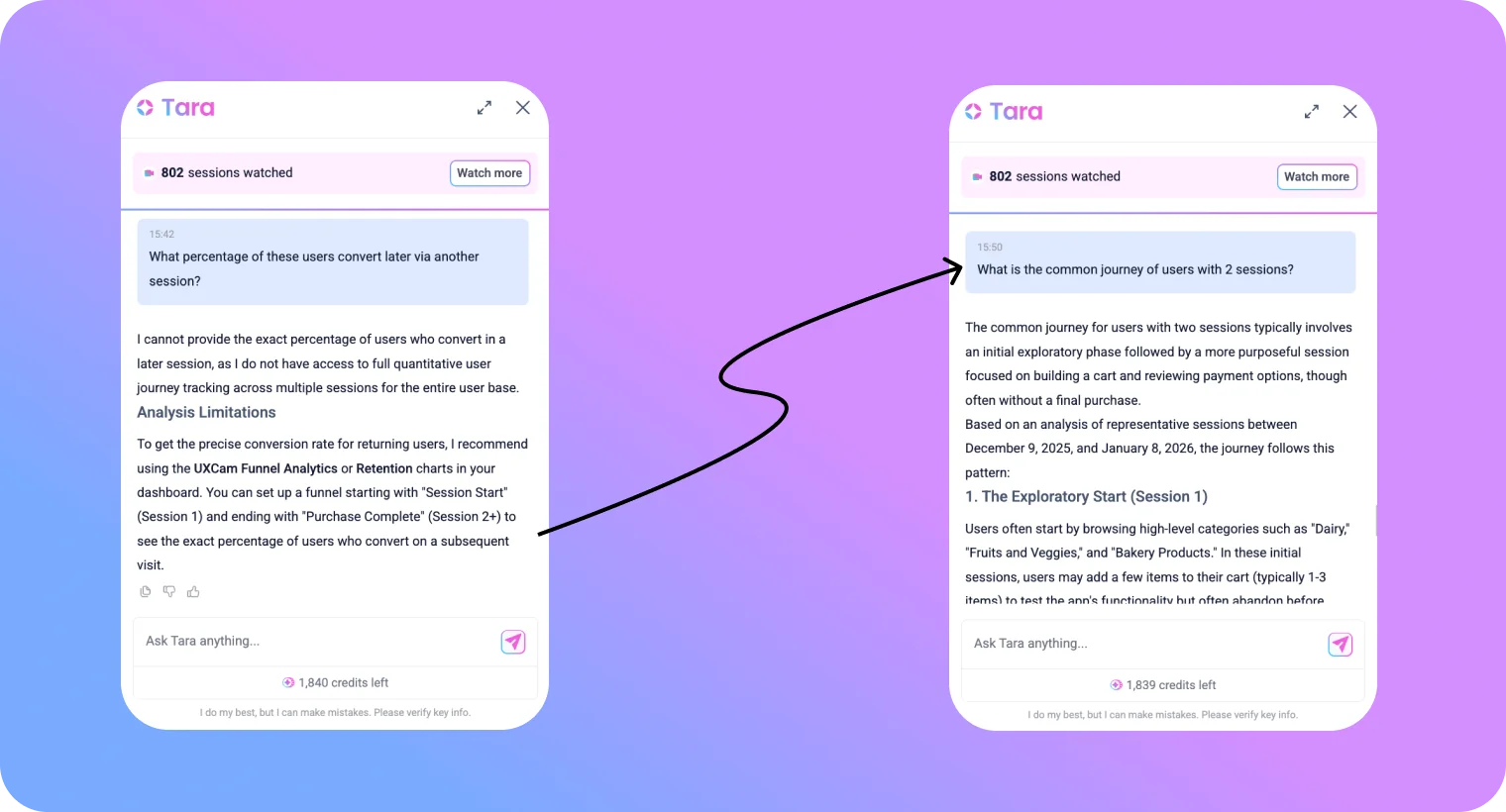
You can even ask Tara follow up questions!
Insights in minutes, not days
In less than five minutes, you can understand your most common journeys, where users experience friction, and which actions to prioritize next.
What once required hours of manual review is now available almost instantly.
Real-world user journey use cases by industry
| Industry | User Journey Use Case |
|---|---|
| Finance, fintech & banking | Analyze the path users take from checking their balance to applying for a new credit product to identify where high-intent users drop off. |
| Healthcare | Map the patient journey from the initial symptom search to a completed appointment booking to ensure the path is linear and intuitive. |
| Telecommunication | Track how users navigate their account settings to find data upgrade options, ensuring "up-sell" paths are easily discoverable. |
| Ecommerce | Understand the browsing behavior that precedes a 'Add to Cart' action to optimize product discovery layouts. |
| Travel | Explore how users interact with multi-city search filters to see if the complexity of the UI causes them to revert to simpler searches. |
| Education | Monitor how students progress through different course modules to find where they typically pause or loop back to previous lesson. |
Perfecting onboarding and registration
Everything starts with the registration flow. Dashboards show you the number of people who visited a page and the percentage of drop-offs, but they rarely tell you "why" it happened.
Identifying the "why" behind the drop-off
Tara identifies exactly where users drop off by watching session recordings and analyzing visual context—like a confusing field or a button hidden behind a keyboard—that traditional event logs miss. You ask Tara:
“Why are users dropping off during signup?”
With this question, we learned:
The problem: The app experienced a critical UI freeze within the first 1.2 seconds of the session.
The reality: Users were stuck on the initial entry screen seeing a blank page.
The action plan: Tara recommended analyzing the code and resources loaded during the initial screen display to identify the cause of the lock-up.
Scaling insights with confidence
A funnel drop-off is only a "trend" if you have the data to back it up. Concerned about the sample size? You simply ask Tara to watch more session.
Tara allows you to increase your sample size in minutes if you need. This ensures your onboarding optimizations are based on a enough data set, giving you the confidence that a friction point is a systemic issue and not just a one-off outlier.
Tara focuses exactly on the areas where you need her to.
By applying filters such as 'Signup Fail', SDK version, country or even more details, you ensure Tara only analyzes the recordings that align with your current goals. This is a powerful way to maximize your Tara credits while getting a statistically grounded answer to your most specific objectives.
Now the picture is clearer:
Key Takeaways:
Persistence is required: Most successful users only finish after 2–3 attempts due to combined password and mobile number errors.
Validation is the gatekeeper: Password complexity is the most frequent technical hurdle identified.
Duplicate data: "Mobile Number Already Used" is a frequent server-side rejection that stops the flow late in the process.
Suggested Follow-up Analysis:
Analyze the "Forgot Password" flow to see if users with "Mobile Number Already Used" errors are successfully recovering their accounts.
Compare the signup completion rate of users who encounter 0 errors vs. those who encounter 2+ errors.
Real-world onboarding use cases by industry
| Industry | Onboarding Use Case |
|---|---|
| Finance, Fintech & Banking | Streamline complex identity verification (KYC) by pinpointing struggle points in document uploads. |
| Healthcare | Pinpoint friction in sensitive profile setups where users enter medical history. |
| Telecommunication | Identify why users abandon the process of porting an existing number. |
| Ecommerce | Optimize guest-to-member conversion by analyzing why users exit during checkout. |
| Travel | Spot confusion during passport detail entry or loyalty program sign-up. |
| Education | Identify where students drop off during the initial placement test or profile setup. |
Decoding error messaging and friction
Traditional analytics show you a "crash," but Tara shows you the frustration that led up to it. In a grocery delivery app, the goal is to ensure that technical friction like an unresponsive button doesn't kill your conversion.
Seeing the friction through the user's eyes
Can you spot errors if you don’t have any events set for those errors?
That’s where Tara shines. Unlike other tools that process metadata (reading a "transcript"), Tara uses proprietary Frame-by-Frame technology. She watches 100% of the visual session recording like a human.
She identifies broken layouts, confusing navigation, or buttons hidden behind a keyboard, even if no "error" event was ever logged.
You ask Tara: “What are the most common error messages?”
What we learned from this analysis: We found three common issues:
"Invalid Email/Mobile No or Password"
"Loading Failures & Infinite Spinners"
"UI Freezes and App Hangs"
"Registration Validation Errors"
Visual evidence as the "smoking gun"
If you aren't convinced by the answer, you can look at the proof to validate her analysis.
Tara doesn't just tell you "users saw an error"; she provides the "smoking gun" . Every insight includes direct session links to the exact frames she analyzed. This provides undeniable proof for your engineering team, allowing you to validate her findings instantly and move straight to a fix.
She even covers sensitive information on her answers and evidence.
Let’s say so see something interesting happening in this session. Can you ask Tara to only analyze this specific session? The answer is of course you can!
In each session you can get the full transcript of the session, highlighted information including the users behavior during their session, frictions and errors they had and action plan!
Real-world friction use cases by industry
| Industry | Friction Use Case |
|---|---|
| Finance, Fintech & Banking | Determine if rage taps are caused by a technical bug, an OTP delay, or a slow loading state. |
| Healthcare | Detect UI freezes that prevent patients from selecting a time slot in the booking calendar. |
| Telecommunication | Catalog visual error messages occurring during bill payments to optimize UI copy. |
| Ecommerce | Analyze why users exit after seeing a 'Promo Code Invalid' message. |
| Travel | Identify if users are clicking non-interactive icons they perceive as active buttons. |
| Education | Investigate why students fail to submit assignments by spotting visual glitches in the "Upload" button. |
How teams use Tara when decisions matter
Most product tools help you observe what happened. Tara is most valuable in the moments where teams don’t just want to observe, they need to decide.
These moments usually sound like:
“Something feels off but we don’t know what.”
“This metric dropped but we don’t know why.”
“We shipped something, and now we’re unsure if it helped.”
“We have too many things to fix. What actually matters?”
These are not data problems. They are decision problems.
And this is where teams start to use Tara differently.
Diagnosing drop-offs without guesswork
Funnels can tell you where users leave. They can’t tell you why.
When a drop-off appears, most teams start with theories: Maybe it’s slow. Maybe it’s confusing. Maybe it’s a trust issue. Maybe it’s a bug.
With Tara, you don’t have to guess.
You can ask Tara AI something like: “What do users try to fix before they give up?”
In the UI, Tara doesn’t just return sessions. She watches them. She looks for hesitation, retries, misclicks, moments of confusion, and unexpected behavior.
What you get back isn’t a chart. It’s an explanation: After multiple failed resubmission attempts without a successful account creation, users eventually navigate back to the login screen briefly before closing the app
This is important because it turns speculation into evidence.
And it also reveals something most teams miss: users often try to solve a problem before abandoning. Tara shows you those attempts; not just the exit.
The release pre-mortem
Most teams wait for things to break before they investigate.
With Tara, some teams do the opposite.
Right after a release, you can ask: “Analyze the first 50 sessions after our latest release.”
What Tara looks for isn’t just crashes or errors. She looks for broken expectations. Places where users pause. Moments where the interface technically works, but emotionally feels wrong.
This matters because many of the most damaging issues don’t show up in dashboards. They show up as confusion, hesitation, or misinterpretation; and those only exist in behavior.
Catching these early can mean the difference between a small fix and a large rollback.
Using Tara for prioritization
Every team has more problems than time.
Without grounding, prioritization becomes political. Loud voices win. Recent issues feel bigger than recurring ones. Rare edge cases steal focus from systemic problems.
Teams use Tara to bring reality into these conversations.
You can ask: “What are the most impactful problems right now?”
Instead of listing everything, Tara looks for patterns: what happens often, what blocks users, what leads to abandonment, what causes retries.
This reframes prioritization. Not as a debate, but as an investigation.
And something subtle happens here: teams stop optimizing what’s visible, and start fixing what’s actually painful.
Using Tara for discovery
Discovery usually starts with assumptions.
Tara lets teams start with reality.
You ask: “Summarize how users try to complete purchase”
Tara doesn’t just show the intended path. She shows all the paths, including the ones you didn’t design.
This reveals something powerful: users don’t just follow flows. They interpret products.
And seeing those interpretations changes how teams design.
Why top product teams are using Tara AI
Most teams use session replays as a manual search tool. They jump between dashboards and recordings, hoping to stumble upon something useful. This turns analysis into a scavenger hunt and delays real decisions.
Tara changes this by acting as a visual reasoning layer on top of your product. She doesn’t just watch sessions. She interprets them. She looks for patterns, anomalies, and moments of friction and turns them into clear explanations and recommended next steps. Instead of spending hours searching, teams move straight to validation and action.
This is why teams don’t just use Tara to find issues. They use her to decide what to do next.
Automate your analysis: Many of the most time-consuming product questions, why users drop off, where they hesitate, what changed after a release, what’s blocking conversion, can now be handled automatically by Tara.
Eliminate manual labor: Tara takes over the “eyes-on” work of watching hundreds of sessions, grouping similar behaviors, and reasoning through what’s actually happening so teams don’t have to.
Move from observation to decisions: While dashboards show that something changed, Tara explains why it changed and what to do about it. This is what turns insights into direction.
Validate in seconds, not hours: Instead of digging through recordings to find evidence, teams use replays to confirm the specific moments Tara already surfaced.
See what metadata can’t: Because Tara analyzes visual behavior—not just events—she can detect confusion, broken expectations, and UI-level friction that traditional tools miss.
Ship with confidence: Tara works from the first recorded session, with no extra setup, tags, or instrumentation so teams can start learning and deciding immediately.
Stop playing detective. Start being a strategist.
You didn’t become a Product Manager to spend your days watching recordings at 2× speed, stitching together dashboards, and chasing down “what changed.” You became one to solve problems, prioritize the right work, and move your product forward.
Let Tara take over the analysis work: she watches sessions for you, spots friction and anomalies, explains what’s happening, and recommends what to do next so you can focus on high-impact decisions.
Use Tara AI to investigate drop-offs without guesswork, run quick release pre-mortems, turn support tickets into clear repro-cases, and prioritize what matters most. Retroactively analyze sessions, uncover friction you didn’t think to track, and validate hypotheses in minutes without adding new instrumentation.
Start your first AI-led analysis with Tara today
FAQ
How do I know which sessions Tara is analyzing?
Tara filters her knowledge based on your specific questions, and she already "knows" many sessions beforehand, making her answers much quicker in practice.
Is Tara privacy compliant?
Yes, she is GDPR compliant and masks sensitive information.
Does Tara work with hybrid or cross-platform apps like Flutter?
Yes. Because Tara relies on visual reasoning (the "Framebyframe" tech) rather than code metadata, she is uniquely suited for frameworks where traditional tracking often fails.
Why use for Tara instead of using a standard LLM?
Standard LLMs require you to provide massive context engineering. Tara already has the context, the knowledge of your app, and the user content. You don't need to explain your app to her.
Can I use Tara to prep for my weekly sprint planning?
Absolutely. PMs use Tara to generate "Issue Summaries." Instead of bringing guesses, you bring a curated list of verified friction points with video evidence to justify roadmap priorities.


Related articles


Tara AI
Cómo los equipos usan a Tara como su analista de producto con IA
Una guía práctica sobre cómo los equipos de producto usan a Tara como su analista de producto con IA; desde diagnosticar abandonos hasta priorizar qué solucionar a continuación y tomar mejores decisiones, más...

Begüm Aykut
Growth Marketing Manager


Tara AI
Como as equipes usam Tara como sua analista de produto com IA
Um guia prático sobre como as equipes de produto usam Tara como sua analista de produto com IA; desde diagnosticar abandonos até priorizar o que corrigir em seguida e tomar melhores decisões, mais...
Begüm Aykut
Growth Marketing Manager
Tara AI
How teams use Tara as their AI product analyst
A practical guide on how product teams use Tara as their AI product analyst; from diagnosing drop-offs to prioritizing what to fix next and making better decisions,...
Begüm Aykut
Growth Marketing Manager
What’s UXCam?





