Smartlook vs UXCam: Which is the better mobile app analytics solution for modern teams?


If you've been using Smartlook for your mobile app or you're evaluating it right now, you've probably run into a few things that don't feel right. Maybe the React Native SDK hasn't kept up with the latest architecture changes. Maybe you're trying to get meaningful gesture data on Flutter and hitting walls. Or maybe you've just noticed that Smartlook's product changelog looks the same as it did in 2023.
You're not imagining it. Since Cisco acquired Smartlook, visible product development has slowed significantly. For web projects, that might be tolerable. For production mobile apps where OS updates, framework releases, and privacy changes happen constantly, a stagnant analytics tool becomes a liability.
This guide puts Smartlook and UXCam side by side with the specific technical and capability differences that matter when you're running a React Native, Flutter, iOS, or Android app in production.
Smartlook vs UXCam at a glance
Before diving into the details, here's a side-by-side overview of how Smartlook and UXCam compare across the criteria that matter most for mobile teams.
| Criteria | Smartlook | UXCam |
|---|---|---|
| Core architecture | Web-first, adapted for mobile | Mobile-first, expanded to web |
| React Native support | Supported, but limited recent updates to keep pace with New Architecture changes | Actively maintained SDK with video recording, occlusion, crash logs, and unresponsive gesture detection on both iOS and Android |
| Flutter support | Supported, but limited investment in keeping up with rendering engine changes (e.g., Impeller) | Actively maintained with video recording, occlusion, screen tagging, and crash logs; ongoing development for Impeller compatibility |
| Native iOS support | Standard session replay and event tracking | Full support including auto screen tagging, schematic recording, Smart Events, unresponsive gesture detection, and SwiftUI compatibility |
| Native Android support | Standard session replay and event tracking | Full support including fragment-level auto tagging, Jetpack Compose support, Smart Events, and unresponsive gesture detection |
| Additional frameworks | Does not support NativeScript | Also supports Cordova, Ionic Capacitor, Xamarin/MAUI, and NativeScript |
| Session replay quality | Basic mobile replay; limitations in gesture capture clarity and consistency at scale | High-fidelity replay with full gesture capture (taps, swipes, scrolls, multi-touch), accurate timelines, and synchronized event data |
| Heatmaps | Limited customization, minimal gesture detail, no dynamic scrollable heatmaps, limited filter options | Position-based with gesture detail, aggregated page data, dynamic scroll support, first/last click tracking, and one-click generation |
| Event tracking approach | Manual event setup required; limited retroactive analysis | Intelligent autocapture (captures 95%+ of interactions automatically) plus Smart Events for no-code retroactive event creation |
| AI-powered analysis | None | Tara: AI product analyst using visual analysis to identify friction, explain behavior, and recommend actions |
| Issue analytics | Basic crash reporting | Integrated crash, rage tap, UI freeze, and frustration signal tracking—all linked directly to session replay for visual reproduction |
| Funnel analytics | Basic funnel analysis | Granular funnels with precise filtering, grouping, conversion criteria, before/after comparison, and direct links to session replays at each drop-off point |
| Filtering & segmentation | Known issues with session-to-user grouping, limited labeling, restricted advanced segments | Advanced segmentation by behavior, device, custom properties, or events with flexible filtering |
| Privacy & occlusion | GDPR compliance; basic data masking | GDPR/CCPA/HIPAA compliance, SOC 2 Type 2, granular occlusion (hide screen/view/text), schematic recording, flexible data centers |
| SDK footprint | Not publicly documented in detail | Lightweight: ~500KB on iOS, ~250KB on Android; runs on background thread; data uploads only when app is backgrounded |
| SDK maturity | Mobile SDK less mature; built on web-first foundation | Battle-tested across 37,000+ apps; close to 70% market share in mobile session replay |
| Cross-platform analytics (mobile + web) | Supports web and mobile, but as a web-first tool adapted for mobile | Unified mobile and web analytics in one platform; manage both from a single subscription with consistent session replay, funnels, and dashboards |
| Product update velocity | Very few meaningful mobile updates since 2023 | Regular releases across all platform SDKs; active investment in AI product analytics capabilities |
| Long-term viability for mobile | Increasingly a legacy option; acquisition has slowed development | Actively investing in mobile analytics, web analytics, AI capabilities, and cross-platform support |
Now let's get into the specifics behind each of these differences.
What is Smartlook?


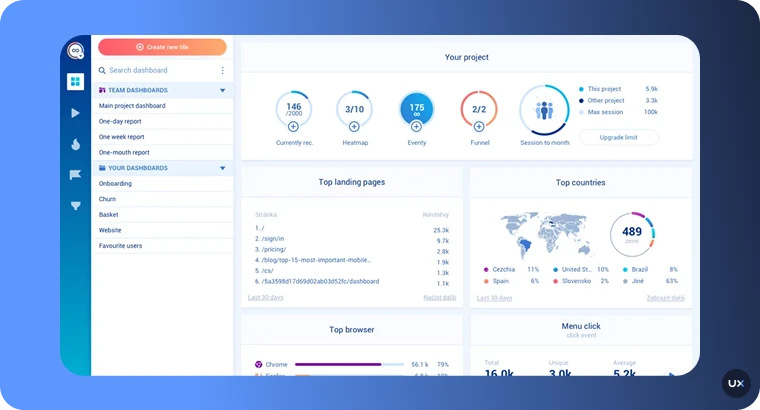
Smartlook is a product analytics and session replay tool that supports both web and mobile platforms. It was originally built for web and later expanded to mobile, which is an important detail we'll come back to.
On the surface, Smartlook covers the basics: session recordings, heatmaps, event tracking, funnel analysis, and crash reporting. It integrates with tools like Segment, Mixpanel, and Amplitude, and it offers user identification to tie session data to individual users.
But when you dig into the mobile experience specifically, the picture gets more complicated.
How Smartlook works on mobile
Smartlook's mobile SDKs support iOS, Android, React Native, and Flutter. Installation follows a standard pattern—add the dependency, initialize with your project key, and start capturing.
For basic session recording on native iOS and Android, Smartlook works. You get recordings, you get basic event tracking, and you can set up funnels to find drop-off points.
Where things start to break down is in the details that matter most for mobile teams:
Heatmap depth is limited. Smartlook's heatmaps offer a simplified view of user interactions. There's minimal gesture-level detail—you won't get swipe direction tracking, scroll depth analysis, or first-click vs. last-click differentiation. The customization options are restricted compared to what mobile UX teams typically need to make design decisions. There's no support for dynamic scrollable heatmaps, which means if your app has complex scrolling containers (common in ecommerce, social, and content apps), you're getting an incomplete picture.
Event tracking requires manual setup. To track specific interactions, you need to manually define events—typically with developer involvement. This means your product team depends on engineering to instrument each interaction before you can analyze it. For most apps, teams end up tagging only a small fraction of total interactions, leaving most user behavior untracked.
Filtering and segmentation have known gaps. Users have reported issues with Smartlook not grouping all sessions to users correctly, limited user labeling options, and restricted advanced segment creation. When you're trying to isolate a specific cohort—say, users on a particular device who abandoned checkout after seeing an error—these limitations slow down every investigation.
Cross-framework support is uneven. While Smartlook lists React Native and Flutter support, the depth of that support has not kept pace with how these frameworks have evolved. React Native's New Architecture (Fabric renderer, TurboModules) and Flutter's evolving rendering engine (including the Impeller engine) require analytics SDKs to continuously adapt. A slower update cadence means compatibility risks compound with every framework release.
Smartlook pricing
Smartlook has three plans. The Free plan includes limited session recordings and basic event tracking. The Pro plan starts at $55/month and adds funnels, heatmaps, advanced filters, and longer data retention. The Enterprise plan is custom-priced with higher volumes, extended retention, SSO, and priority support.
What happened after Cisco acquired Smartlook
Cisco acquired Smartlook, and since then, product momentum has slowed noticeably. There have been very few meaningful mobile-focused updates since 2023. For context, this is a period during which Apple released iOS 17 and 18 with significant privacy and SDK changes, Google pushed major Android updates, React Native shipped the New Architecture as default, and Flutter released multiple stable versions with rendering engine changes.
Each of those changes can break or degrade analytics SDK behavior if the vendor isn't actively maintaining and testing against them. When your analytics provider's update cadence can't keep up with the platforms you build on, you end up with subtle data gaps; missed gestures, broken replays, performance regressions—that erode trust in your insights over time.
This isn't speculation. It's the practical risk of depending on a tool that's no longer actively evolving for mobile.
What is UXCam?


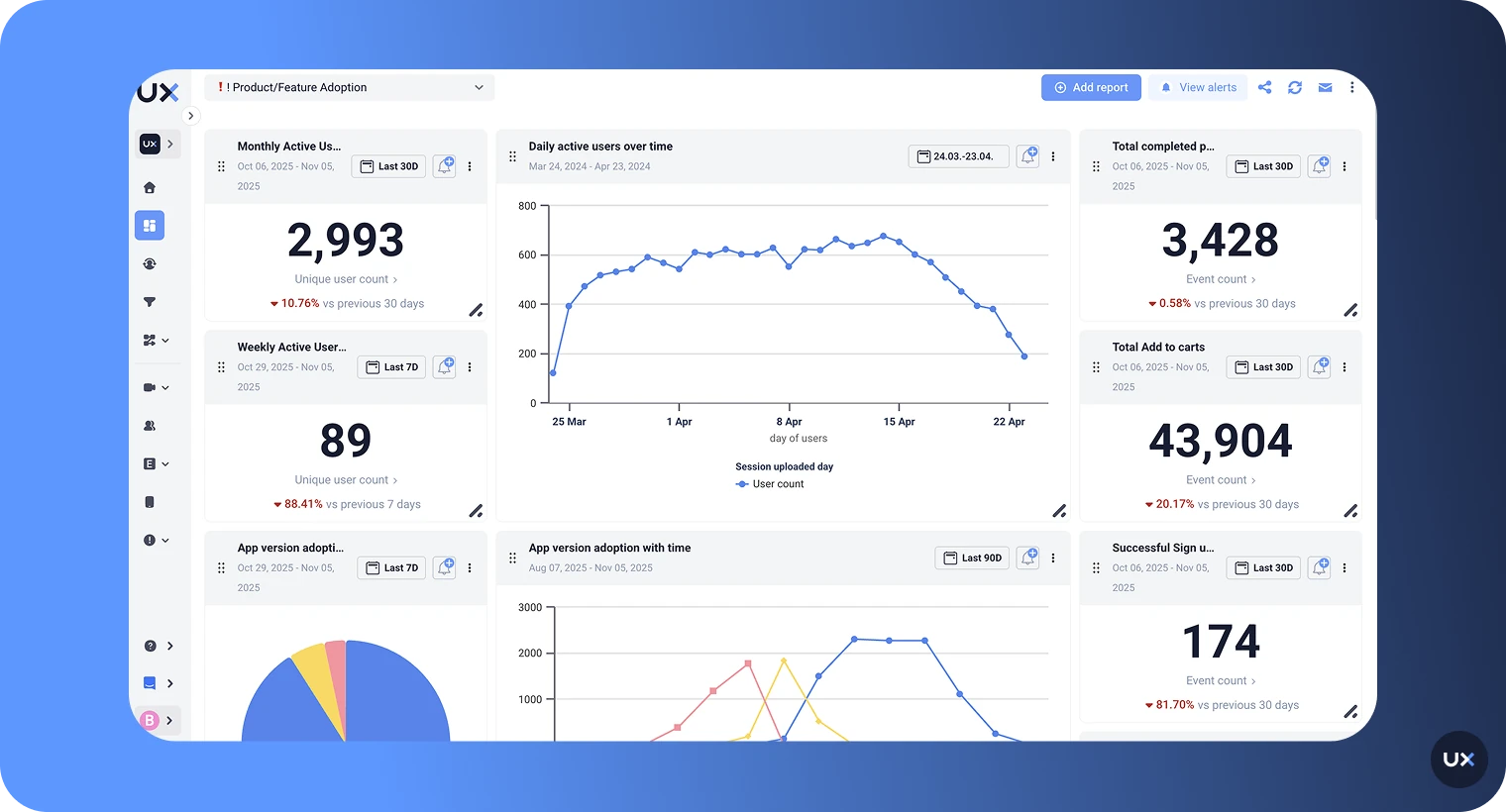
UXCam is an AI powered product analytics platform that was purpose-built for mobile apps and now also supports web analytics. It combines session replay, heatmaps, funnel analytics, retention analysis, issue analytics, and AI-powered insights in one platform—designed to help teams understand not just what users do, but why they do it.
This is worth emphasizing: UXCam is not a mobile-only tool. Teams that manage both a mobile app and a web product can run both from a single UXCam subscription, with consistent analytics, shared dashboards, and the same session replay quality across platforms. You don't need to buy a separate web analytics tool and try to stitch together insights from two different systems.
The distinction between "web-first, adapted for mobile" and "mobile-first, expanded to web" isn't marketing language. It shows up in concrete ways.
How UXCam works on mobile
UXCam's SDK architecture was designed from the ground up for mobile environments. The native SDKs for iOS and Android form the foundation, with framework-specific wrappers built on top for React Native, Flutter, Cordova, Xamarin, and NativeScript.
Here's what that means in practice:
Autocapture eliminates the instrumentation bottleneck. When you install UXCam's SDK—which takes minutes, not days—it automatically starts capturing screens, gestures (taps, swipes, scrolls), navigation events, and technical issues without requiring you to define events upfront. Most analytics tools depend on manual event instrumentation, which means teams typically only track 1–5% of what users actually do in their app. UXCam's intelligent autocapture covers the other 95%, giving you retroactive access to behavioral data you didn't think to track. This is a fundamental difference. With Smartlook, you need to know what you're looking for and set up tracking before you can analyze it. With UXCam, you can ask questions about user behavior after the fact, because the data is already there.
Session replay captures the full mobile experience. UXCam records high-fidelity sessions that include every gesture, screen transition, and interaction; not just clicks. On mobile, this matters because user behavior is gesture-driven: swipes, pinch-to-zoom, long presses, pull-to-refresh, and multi-touch interactions all carry meaning that click-based tracking misses. The replays are synchronized with event timelines, so you can jump from a metric (like a funnel drop-off) directly to the moment in the session where it happened.
Heatmaps go beyond basic tap visualization. UXCam offers position-based heatmaps with gesture-level detail: tap heatmaps, scroll heatmaps, and swipe tracking. You get aggregated heatmap data for grouped pages (like all product detail pages), dynamic heatmaps that support multiple scrollable containers, first-click and last-click differentiation, and one-click heatmap generation. UXCam's internal benchmarking found that competitors like Smartlook offer significantly less customization, less gesture detail, and no support for dynamic scrollable heatmaps—a gap that becomes a real problem in apps with complex UI layouts.
Issue analytics connect crashes to context. UXCam doesn't just count crashes. It tracks rage taps (rapid repeated taps on unresponsive elements), UI freezes, unresponsive gestures, and error states—then links each one directly to the session replay showing what the user experienced. Your engineering team gets a visual reproduction case, not just a stack trace. This turns crash investigation from hours of log-digging into minutes of watching exactly what happened.
Smart Events let product teams define events without code. For native iOS and Android apps (SDK 3.6.7+ for iOS and 3.6.18+ for Android), Smart Events let you define meaningful user interactions directly from the UXCam dashboard, no developer involvement required. You can retroactively create events based on gestures and interactions that were already captured by autocapture. This means your product team can analyze new hypotheses without waiting for an instrumentation sprint.
UXCam pricing
UXCam offers a Free plan with up to 3,000 monthly sessions, session replays, user analytics, and basic filters—no credit card required. The Starter plan adds complete product analytics, sampling, user journey analytics, performance monitoring, and integration/onboarding manager support for 10,000+ monthly sessions. The Enterprise plan includes limitless product analytics, a dedicated customer success manager, advanced exports, multi-org management, SSO/SAML, and security & legal review. See full pricing details or request a demo to see it yourself.
Smartlook vs UXCam for React Native, Flutter, iOS, and Android
This is where the comparison matters most for teams searching for a "Smartlook React Native" or "Smartlook Flutter" alternative. Let's walk through each platform and compare what both tools actually deliver.
React Native
React Native is one of the most popular cross-platform mobile frameworks, and its recent shift to the New Architecture (Fabric renderer, TurboModules) has significant implications for analytics SDKs. Any tool that doesn't actively adapt to these changes risks broken recordings, missed interactions, or performance issues.
Smartlook on React Native: Smartlook provides a React Native SDK that supports session replay and event tracking. However, since the Cisco acquisition, updates to the React Native wrapper have slowed. The New Architecture introduces fundamental changes to how React Native renders components and manages native modules. An SDK that hasn't been updated to account for these changes may produce incomplete or inaccurate session recordings—particularly for apps that have already migrated. Smartlook's documentation doesn't indicate specific New Architecture support or optimization.
UXCam on React Native: UXCam's React Native SDK is actively maintained and supports video recording, session data, events, and crash logs on both iOS and Android. It includes privacy occlusion at the screen, view, and text level—so you can mask sensitive fields like credit card numbers or personal data directly in recordings. Schematic recording (a privacy-friendly mode that captures layout without visual detail) is available on iOS. Unresponsive gesture detection works on both platforms, which is critical for identifying rage taps and broken interaction patterns.
Flutter
Flutter presents unique analytics challenges because it uses its own rendering engine (Skia, and increasingly Impeller) rather than platform-native UI components. This means analytics SDKs can't rely on standard platform APIs to capture what's on screen—they need Flutter-specific approaches.
Smartlook on Flutter: Smartlook offers a Flutter SDK, but its mobile development slowdown raises concerns for Flutter teams specifically. Flutter's rendering engine evolves rapidly—the transition from Skia to Impeller changes how frames are rendered, which directly affects how analytics tools capture session recordings. Smartlook's Flutter documentation doesn't reflect recent adaptation to these rendering changes. For teams using Flutter in production, this creates a growing compatibility risk with each Flutter stable release.
UXCam on Flutter: UXCam's Flutter SDK supports video recording, session data, events, and native crash logs on both iOS and Android. Screen tagging works through Flutter's route observer pattern, with a guided setup. Privacy occlusion for views, texts, and screens is supported with Flutter-specific implementation guides.
Native iOS
Native iOS apps have the broadest feature support from both tools, but the depth differs significantly.
Smartlook on iOS: Smartlook's iOS SDK provides session replay, event tracking, and basic crash reporting. It covers the fundamentals for simple use cases. However, the limited update cadence means the SDK may not be optimized for the latest iOS versions, particularly around privacy framework changes (App Tracking Transparency updates, Privacy Manifests) that Apple introduces with each major release.
UXCam on iOS: UXCam offers the most complete feature set on native iOS: video recording, session data, crash logs, auto screen tagging for UIKit view controllers, all occlusion options (hide screen, hide view, hide text), schematic recording, and unresponsive gesture detection. Smart Events are fully supported (SDK 3.6.7+), letting product teams create events from the dashboard without code changes. SwiftUI is supported for recording and occlusion, though auto screen tagging and schematic recording aren't available for SwiftUI views yet.
Native Android
Android's device fragmentation (thousands of device types, manufacturer customizations, varying OS versions) makes SDK maturity especially important.
Smartlook on Android: Smartlook provides session replay and event tracking on Android. As with iOS, the core functionality works for basic use cases. But Android's fragmentation means an analytics SDK needs to be regularly tested across a wide range of devices and OS versions. Limited updates increase the risk of edge-case failures—sessions that don't record properly on certain devices, or gestures that get missed on specific manufacturer UI layers.
UXCam on Android: UXCam offers full feature support on native Android: video recording, session data, crash logs, auto screen tagging (including fragment-level tagging), all occlusion options, and unresponsive gesture detection. Jetpack Compose is supported for recording with occlusion guides available. Smart Events are fully supported (SDK 3.6.18+). UXCam's SDK has been battle-tested across 37,000+ apps, which means it's been validated on far more device/OS combinations than most competitors—reducing the risk of production edge cases.
Additional framework support
Smartlook: Supports iOS, Android, React Native, and Flutter. Does not support NativeScript.
UXCam: Supports all of the above plus Cordova, Ionic Capacitor (Angular, Vue, React), Xamarin/MAUI, and NativeScript (Angular/Vue). For teams on less common frameworks, this broader coverage can be a deciding factor.
The bottom line on platform support
If you're running a production mobile app on any of these platforms, the reliability and update cadence of your analytics SDK isn't optional. It directly affects the quality of your data and, by extension, the quality of your decisions. Smartlook's slower pace of development means growing risk across all platforms, while UXCam's active investment in each framework gives mobile teams more confidence that their analytics will keep working as platforms evolve.
One platform for mobile and web
If your team manages both a mobile app and a web product, this is a practical advantage worth highlighting. UXCam now supports web analytics alongside its mobile platform, so you can track user behavior across both from a single account.
This means your product team doesn't need to learn two different tools, maintain two separate analytics configurations, or manually cross-reference insights from different platforms. Your funnels, dashboards, session replays, and segmentation work consistently across mobile and web. When a user starts a journey on your website and continues in your app (or vice versa), you have visibility into both sides.
Smartlook also supports both web and mobile, but since it was built web-first, its mobile capabilities have always been the weaker side. UXCam took the opposite path; perfecting mobile first, then bringing that same quality standard to web. The result is a platform where mobile depth isn't compromised by trying to serve web first.
How Tara changes what's possible with session analytics
This is the capability gap that no comparison table can fully capture.
Most session replay tools—including Smartlook—give you recordings and leave the analysis work to you. Your team manually watches sessions, tries to spot patterns, and builds hypotheses based on whatever they happen to see. Based on our research, the typical manual workflow looks like this: someone sits for 30 to 60 minutes, watches 10 to 20 recordings, and comes away with maybe 2 or 3 insights. That's a tiny sample with inconsistent coverage.
Tara, UXCam's AI product analyst, eliminates that bottleneck entirely.
Tara isn't a chatbot or a summary feature. She's an AI teammate that watches real user sessions using agenting vision for visual analysis—the same way a human analyst would—and surfaces what matters: friction patterns, broken flows, hesitation, confusion, rage taps, and error states. She then explains why users are struggling and recommends specific actions.
Here's what makes Tara fundamentally different from AI features in other analytics tools:
She analyzes visual behavior, not just metadata. Most AI tools in analytics (including those from Amplitude, FullStory, and PostHog) rely on event logs, tags, and metadata. If no event is set, they get no insight. Tara watches the actual visual content of session recordings frame by frame. She can detect issues that never get logged: confusing UI states, non-responsive elements, buttons hidden behind keyboards, broken layouts, and silent failures. This is especially powerful for mobile apps, where UI context is harder to "transcribe" into metadata than web.
She works without event setup. Because Tara analyzes visual recordings rather than relying on predefined tracking, you don't need to have events instrumented to get insights. Teams often track only 1–5% of their app via events. Tara provides visibility into the untagged 95%. You can find issues you didn't know to look for simply by asking a natural language question, including your own language.
She's built for mobile-first analysis. Tara is specifically optimized for the complexities of mobile UI analysis, where metadata-only tools miss critical visual context that only video can provide.
She doesn't hallucinate. Unlike standard LLMs that feel pressure to always provide an answer, Tara is trained to let you know when the data isn't there. When she does provide an insight, it's always backed by direct links to the exact session moments she analyzed, so your team can validate her findings instantly.
She goes from insight to action plan. Most analytics tools stop at observation, they tell you what happened. Tara brings a hypothesis, shows the evidence, and provides concrete action plans. She turns problems into prioritized opportunities.
In practical terms, this means you can ask Tara questions like:
"Why are users dropping off during checkout?"
"What are the common error messages users see?"
"Find sessions with UI freezes on the payment screen"
"How are users interacting with our new feature for the first time?"
"What are the most common user journeys in my app?"
Tara returns not just relevant sessions, but explanations of what's happening, why it matters, and what to do about it, with links to the specific moments in each session that support her analysis.
Smartlook has no equivalent capability. If you're using Smartlook, every insight requires someone on your team to manually find it.
Real scenarios where the difference matters
Feature comparisons are useful, but what actually matters is how these tools perform in the moments your team needs them most.
Scenario 1: Your React Native app has a checkout drop-off and you don't know why
With Smartlook, you'd set up a funnel (assuming the events are already instrumented), see the drop-off percentage, and then manually start watching session recordings trying to spot the problem. You might watch 20 sessions over an hour and maybe identify a pattern—or maybe not.
With UXCam, you'd see the drop-off in your funnel, click through to the sessions at that step, and ask Tara: "Why are users dropping off at checkout?" Tara watches the sessions, identifies patterns (maybe users are tapping a disabled button, or the keyboard is hiding the "confirm" field, or a specific error message is appearing), explains what's happening, and links you to the exact moments as proof. The whole process takes minutes instead of hours.
Scenario 2: You just released a Flutter app update and want to catch issues early
With Smartlook, you'd wait for crash reports to come in, or you'd manually sample session recordings looking for anything unusual. If the issue is subtle—like a UI state that technically works but confuses users—you might miss it entirely.
With UXCam, you can ask Tara to analyze the first sessions after your release. She looks for broken expectations, hesitation, confusion, and unexpected behavior—not just crashes. She catches the kind of issues that don't show up in dashboards but lead to silent churn.
Scenario 3: Your product team needs to understand how users actually navigate your app
With Smartlook, you'd need pre-defined events for each screen and action, then piece together the journey from your analytics. If users take unexpected paths (and they always do), you won't see them unless you happened to instrument those paths.
With UXCam's autocapture, every screen visit and gesture is already recorded. Ask Tara "What are the most common user journeys in my app?" and she maps the actual paths users take; including the ones you didn't design for. She shows where users loop, where they get stuck, and what the common vs. uncommon paths look like. Then she explains what it means and what to prioritize.
When Smartlook might still make sense
To be fair, Smartlook isn't the wrong choice for every team. If your primary use case is web analytics with some basic mobile session replay, the free or Pro plan can cover that. If you have a small app with limited complexity and don't need deep gesture analysis, AI-powered insights, or advanced segmentation, Smartlook's simpler toolset might be sufficient.
But if you're building and maintaining a production mobile app, especially on React Native or Flutter where framework changes happen fast, Smartlook's limited update cadence and web-first architecture create real risk. The tool may work today, but the gap between what it offers and what mobile teams need is widening with every OS release and framework update.
For a detailed comparison of pricing between the two tools, see our Smartlook pricing breakdown.
Make the switch with confidence
When comparing Smartlook vs UXCam, the decision comes down to what your mobile team actually needs.
If you need basic session replay for a simple use case, Smartlook can cover that. But if you need an AI powered product analytics platform that captures the full mobile experience, gives your team deep gesture-level insights, connects crashes and friction signals to visual evidence, and includes an AI product analyst that does the analysis work for you, UXCam is the clear choice.
UXCam's mobile SDKs are trusted by 37,000+ products worldwide, with active development across React Native, Flutter, iOS, Android, and additional frameworks. It's the platform built by a team that understands mobile isn't a simpler version of web; it's a fundamentally different environment that requires purpose-built analytics.
Start a free UXCam trial and see what your mobile analytics has been missing.
FAQ
FAQ
Which analytics tool is best for React Native apps?
For React Native, UXCam is the stronger choice. Its React Native SDK is actively maintained with video recording, privacy occlusion, crash logs, and unresponsive gesture detection on both iOS and Android. UXCam's autocapture means you don't need to manually instrument every interaction, and Tara (UXCam's AI product analyst) can analyze sessions to surface friction without requiring predefined events. Smartlook supports React Native but has shown limited investment in keeping pace with React Native's New Architecture changes.
Which analytics tool is best for Flutter apps?
UXCam is better suited for Flutter teams. The Flutter SDK supports video recording, screen tagging, occlusion, and crash logs, with active development to handle Flutter-specific rendering challenges like the Impeller engine. Smartlook supports Flutter but its slower update cadence raises compatibility concerns as Flutter continues to evolve rapidly.
How do Smartlook and UXCam compare for mobile session replay?
Smartlook provides basic mobile session replay that captures high-level behavior. UXCam provides high-fidelity mobile replay with full gesture capture (taps, swipes, scrolls, multi-touch), accurate synchronized timelines, and direct integration with issue analytics. UXCam also connects replays to funnel drop-offs so you can jump from a metric directly to the session moment where it happened.
Does UXCam have AI capabilities for session analysis?
Yes. UXCam includes Tara, an AI product analyst that watches user sessions using frame-by-frame visual analysis. Unlike AI tools that rely on metadata and event logs, Tara analyzes what users actually see and do on screen—catching issues that never get tagged as events. She explains friction patterns, identifies behavioral anomalies, and recommends specific actions, all backed by direct session evidence. Smartlook does not offer comparable AI-powered analysis.
Can UXCam replace Smartlook for mobile analytics?
Yes. UXCam covers everything Smartlook offers for mobile—session replay, heatmaps, event tracking, funnel analysis, and crash reporting—and adds significant capabilities: intelligent autocapture, gesture-level heatmaps, integrated issue analytics (rage taps, UI freezes), Smart Events for no-code event creation, AI-powered analysis with Tara, and broader framework support including NativeScript.
Is UXCam only for mobile apps?
No. UXCam now offers both mobile and web analytics within a single platform. Teams can manage mobile app analytics (iOS, Android, React Native, Flutter) and web analytics from one subscription, with consistent session replay, funnels, dashboards, and segmentation across both. This is especially valuable for teams managing products that span both mobile and web, since you don't need separate tools or need to manually stitch together insights from different platforms.
Why do frequent SDK updates matter for mobile analytics?
Mobile platforms change constantly. Major iOS and Android releases can affect SDK compatibility, data capture, and performance. React Native and Flutter push frequent updates that analytics tools must support. Privacy frameworks evolve regularly. An analytics SDK that isn't actively maintained risks silent data gaps, broken replays, and performance regressions—problems that often appear without obvious errors, leading teams to make decisions based on incomplete information.
How does UXCam handle privacy on mobile?
UXCam provides granular privacy controls: you can hide entire screens, specific views, or individual text fields from recordings. Schematic recording mode offers an additional privacy layer for sensitive screens. The platform is GDPR, CCPA, and HIPAA compliant with SOC 2 Type 2 certification and offers flexible data center options. The SDK is designed so no data transfers occur while the user is actively using the app—uploads happen only when the app is backgrounded.
What frameworks does UXCam support that Smartlook doesn't?
UXCam supports NativeScript (Angular/Vue), which Smartlook does not. Both support iOS, Android, React Native, Flutter, and Cordova, but UXCam also covers Ionic Capacitor and Xamarin/MAUI with documented support and active maintenance.
Related articles


Related articles


Tool Comparisons
Top 10 Smartlook Alternatives for Product Teams in 2026
Discover the best Smartlook alternatives for valuable product and UX insights. Explore four powerful tools to enhance app user experience and...


Jonas Kurzweg
Product Analytics Expert
Tool Comparisons
Smartlook vs UXCam: Which is the better mobile app analytics solution for modern teams?
Detailed comparison of Smartlook and UXCam for React Native, Flutter, iOS, and Android apps. See SDK differences, session replay quality, and why UXCam is the stronger choice for mobile...

Begüm Aykut
Growth Marketing Manager


Tool Comparisons
UXCam vs Amplitude: A real comparison for mobile product analytics
Compare UXCam and Amplitude for mobile product analytics. See where event-based metrics work, where they fall short, and how UXCam's AI-powered product analytics platform reveals what's actually happening in your...
Begüm Aykut
Growth Marketing Manager
What’s UXCam?